


Fridge Recipe Generator: Crumb
4.49.00 Reviews
App Specs
- Version
- 1.2.9
- Updated On
- License
- Free
- Downloads
- 10,000+
- Developer
- Crumb App
- Categories
- Food & Drink
- Platform
- Android
Screenshots

 Analysis by AppCompare
My first useful result with Crumb came from treating it as a way to get unstuck, not as a replacement for a cookbook. When I have ingredients but no clear plan, a recipe suggestion can turn “I should use this soon” into an actual dinner idea. That practical focus is what makes Fridge Recipe Generator: Crumb appealing to me: it starts with what is already in the kitchen rather than asking me to shop for a recipe first.
What to expect from an ingredient-first app
Crumb is a Food & Drink app from Crumb App, built around the simple problem of deciding what to cook from available ingredients. The basic workflow is easy to understand: tell it what you have, then look at the meal ideas it returns. That makes it a different starting point from browsing a conventional recipe collection, where you often need to choose a dish before knowing whether your pantry can support it.
I’d approach the suggestions as possibilities, not promises that every recipe will match the exact contents of your cupboards. An ingredient list is only part of cooking: quantities, equipment, appetite, and personal preferences matter too. Before committing, I’d scan a recipe for anything I don’t have and decide whether a simple swap makes sense or whether it is better to choose another result.
This distinction is useful if you are new to cooking from leftovers. The app can help you find a direction, but it cannot make an ingredient safe to use or tell you whether food has been stored properly. I still check freshness myself and use ordinary food-safety judgement, especially with meat and leftovers. The waste-reducing benefit comes from planning around usable food, not from trying to rescue something that should be thrown away.
A low-stress route to your first meal
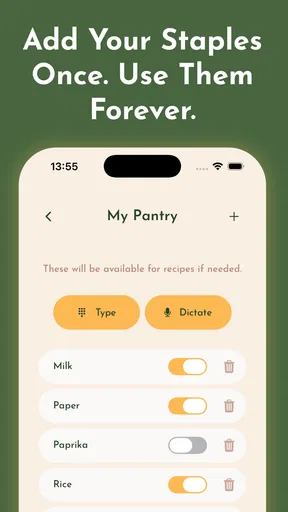
For a first try, I’d pick a meal that is forgiving and enter the ingredients I genuinely want to use, rather than listing every item in the kitchen. Start with the main ingredient, add a few vegetables or pantry staples, and review the suggestions before adding more detail. That keeps the first search focused and makes it easier to see whether the results are relevant.
Once a promising recipe appears, check its full ingredient needs before you begin. If something minor is missing, use the app’s substitution suggestions as a starting point, then apply your own judgement about taste and texture. A missing herb is usually less consequential than a missing base ingredient, so I would not treat every suggested swap as equally suitable. The best first success is a meal where the core ingredients already fit and the adaptation is modest.
For example, if I have a few vegetables that need using and one reliable staple, I can enter those first and browse for a combination that sounds appealing. I’d then check the recipe steps and decide whether I can make it with my usual pan and the time I have. This little pause prevents a common frustration: choosing something that looks right in the results but turns out to need several extra ingredients or more preparation than I want to do that evening.
Worth Reading Before You Choose

Flipboard Shows What News Apps Must Do Beyond the Feed

Switching to Android Auto Means Rethinking Your Driving Routine

Google Calendar Makes a Crowded Week Easier to Manage

Ludo King Makes the Most of the Minutes Between Plans

Baby Panda World Brings Quick Play to Modern Phones, but Its Game Library Feels Busy

ESPN’s Live Game View Makes Following Close Games Easier
Saving a recipe I actually enjoyed gives the app more value on a later busy day. Rather than saving every interesting result, I’d keep only meals I would realistically cook again, perhaps mentally noting which ingredient swaps worked. That turns the saved collection into a more useful personal shortlist instead of a pile of ideas I never revisit.
Getting Started with Crumb
So, downloading the Fridge Recipe Generator: Crumb was a breeze, available on both Android and iOS. Once I had it installed, the interface immediately felt user-friendly. You just start by entering the ingredients you have on hand, and voilà, Crumb works its magic.
What I loved right off the bat was how easy it was to navigate. There’s no clutter, just a clean design that gets straight to the point. If you’re anything like me, you appreciate an app that doesn’t demand a PhD to operate.
It is free to install, with in-app purchases available, so I’d try the basic ingredient-to-recipe flow before deciding whether anything beyond that fits your needs. Its 4.4 average from around 150 ratings and more than 10,000 installs suggest that other people have found a reason to try it, though numbers alone cannot tell you whether its suggestions suit your cooking style. The app is rated for Everyone, and its current version is 1.2.9; on a device running Android, the minimum operating system requirement is Android 10.
How It Works
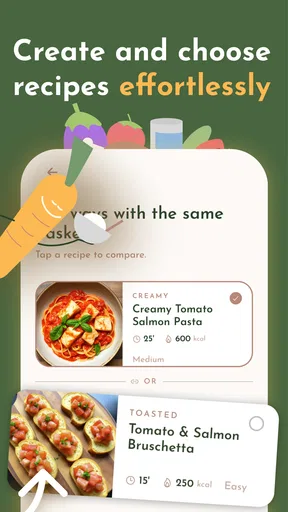
The way Crumb functions is pretty straightforward. You input your ingredients, and it suggests recipes that you can whip up with what you’ve got. I was impressed by the variety and creativity of the recipes. From simple dishes to more elaborate ones, there was something for every mood and occasion.
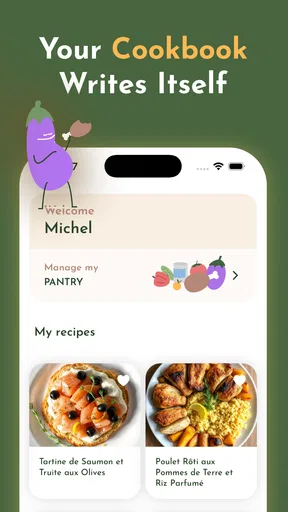
One feature I particularly enjoyed was the ability to save my favorite recipes within the app. It’s a little personal cookbook that I can refer back to whenever I’m in need of inspiration. Plus, the app offers substitution suggestions if you’re missing one or two ingredients, which is super handy.
In practice, the ingredient list you enter shapes the usefulness of the results. I’d be selective and specific enough to separate a substantial ingredient from a seasoning: “rice” and “spinach,” for example, say more about the possible meal than a long list of spices. If I leave out a key item by accident, I may get an idea that sounds good but does not match what I can cook. If the first results feel off, I’d adjust the ingredients rather than assume the whole approach has failed.
There is also a trade-off between flexibility and precision. Broad searches can be helpful when I want inspiration, but they may leave more decisions to me; a tighter list can make the choices feel more practical, though it may narrow the possibilities. I would use the app to generate options, then choose based on what needs using, how much effort I want to spend, and whether the suggested meal fits the people eating it.
The Real-Life Test
Alright, let’s get to the juicy part—how did it perform in real life? I decided to put it to the test on a lazy Sunday when my fridge was looking a bit sparse. I had some chicken, a few veggies, and some basic spices. I plugged those into Crumb and was pleasantly surprised by the number of options I had.
I ended up making a delightful chicken stir-fry that I wouldn’t have thought of on my own. The recipe was easy to follow and didn’t require any complicated techniques or additional trips to the grocery store. It was a win in my book!
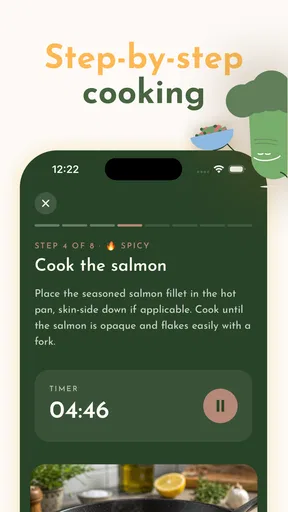
The same approach works well for an ordinary weeknight when plans change: I can check what needs using, enter the ingredients I am willing to cook with, and browse for a meal that does not require a special shopping trip. If I have limited time, I would still read the method before starting, because a promising recipe is not automatically a quick one. That small check helps me decide whether to cook it now, save it for another day, or choose a simpler option.
Crumb is especially suited to people who cook at home but sometimes run out of ideas, and to anyone trying to make better use of food already on hand. It may be less useful if you want exact nutrition planning, tightly controlled meal schedules, or a recipe collection organized around a particular diet. I would also choose a standard cookbook or a manually curated recipe app when I already know the dish I want and need dependable, detailed instructions for that exact meal.
Compared with searching the web for “recipes with these ingredients,” Crumb gives the process a more focused, app-based place to start. A general web search can offer a wider range of sources, but it may take more scrolling and comparison to find a recipe that fits. A traditional cookbook is often better when I want a tested favorite or a specific cuisine; Crumb’s strength is the reverse situation, when the ingredients are fixed but dinner is not. Neither method removes the need to check the recipe and adapt it sensibly.
Why I Keep Using It
Now, you might be wondering, why keep using it? Well, aside from the obvious convenience, Crumb has helped me reduce food waste significantly. I’m no longer tossing out ingredients just because I didn’t know how to use them.
Moreover, it’s expanded my cooking repertoire. I’ve tried recipes and combinations I never would have considered before. It’s like having a mini chef in your pocket, always ready to assist with dinner prep.
My practical tip is to use it before the groceries become a jumble of forgotten odds and ends. When I notice one or two ingredients that should be used soon, I can search around them and let the rest of the meal be flexible. I’d also keep a short mental note of swaps that worked for my taste; that makes future suggestions easier to judge without assuming every substitution will behave the same way in every dish.
There are limits to what ingredient matching can solve. It cannot guarantee that a suggested meal will suit a picky eater, fit a strict dietary requirement, or use every leftover in one go. Nor would I expect every result to be a perfect match for my available time or kitchen setup. If I have a firm nutritional target or need highly precise quantities, I would rely on a tool designed for that job and use Crumb only for inspiration—or skip it for that meal.
The app’s free entry point makes it straightforward to see whether this style of cooking help clicks for you, while the listed in-app purchases range from $2.99 to $36.99 per item. I would not treat a purchase as necessary just to test the central idea; first see whether entering your usual ingredients produces suggestions you would actually make. The release date is September 11, 2024, and the app has nine written reviews alongside its broader rating history, which is a reminder that a rating offers a quick impression rather than a detailed guide to every kitchen routine.
For someone installing it for the first time, the clearest next step is modest: choose a few ingredients you already trust, find one recipe that fits, and make it before building a complicated routine around the app. If that first meal works, save it and return when another unplanned dinner or leftover needs attention. If the suggestions repeatedly demand things you do not have or do not want to cook, a conventional recipe book or a more specialized meal planner may suit you better.
All in all, if you’re looking for a way to spice up your meal planning while making the most of what’s already in your fridge, Fridge Recipe Generator: Crumb is definitely worth checking out. It’s a small app with a big impact on your kitchen routine. Give it a whirl, and you might just find it becomes your new favorite kitchen companion!
Pros
- Easy to navigate interface.
- Wide variety of recipes.
- Personalized meal suggestions.
- Ingredient substitution options.
- Offline access available.
Cons
- Limited dietary restriction filters.
- Occasional app crashes.
- Ads can be intrusive.
- No community sharing feature.
- Requires account for full access.
FAQs for Fridge Recipe Generator: Crumb
What is the primary function of the Fridge Recipe Generator: Crumb app?
The Fridge Recipe Generator: Crumb app helps users create recipes based on the ingredients they have at home. Simply input the items you have in your fridge or pantry, and the app will generate a variety of recipes you can cook. It's designed to reduce food waste and make meal planning more convenient.
Is the Fridge Recipe Generator: Crumb app free to use?
The app offers a free version with basic features, allowing users to generate recipes from their available ingredients. However, there is also a premium version that includes additional features such as advanced filtering, nutritional information, and an ad-free experience. Users can choose based on their needs and preferences.
How accurate are the recipes generated by the Fridge Recipe Generator: Crumb app?
The app uses a sophisticated algorithm to ensure the recipes are accurate and make the best use of your ingredients. While it aims to provide reliable and tasty options, results may vary depending on the specific items and quantities you have. User reviews suggest that most recipes are easy to follow and enjoyable.
Can I save my favorite recipes within the Fridge Recipe Generator: Crumb app?
Yes, the app allows users to save their favorite recipes for easy access in the future. You can bookmark recipes you enjoy and organize them into collections for different occasions. This feature makes it convenient to revisit successful dishes and plan future meals with ease.
Does the Fridge Recipe Generator: Crumb app support dietary preferences and restrictions?
The app includes options to filter recipes based on dietary preferences and restrictions such as vegetarian, vegan, gluten-free, and more. Users can customize their profile to ensure that the generated recipes align with their dietary needs, making meal planning inclusive and personalized.


